Log in with your WHCS Google account!

Showing posts with label Typing. Show all posts
Showing posts with label Typing. Show all posts
Monday, October 5, 2015
Friday, January 23, 2015
Thursday, October 24, 2013
Typing Practice
Grades 1-2
Click on the links below for helpful sites to keep typing skills fresh.
(All programs are web based and don't have to be downloaded.)
Typing.com

Dance Mat Typing

This is a fun site for beginners learning how to type. Start with Level 1 and follow the directions.
Then, move up to the other levels. This site does not time the user and is an engaging, low stress introduction to keyboarding.
Keybr.com

Keybr.com is very straightforward. You can choose from three basic lessons that start with a certain number of keys on the keyboard, and then, as you progress through the lessons, more keys are introduced to the mix to make things a little tougher.

- Typing Adventure
- Big Brown Bear - Learn to Type
- ABCYa! Keyboarding Zoo
- ABCYa! Typing Rocket
- Dance Mat Typing
Grades 3-8th
Click on the links below for helpful sites to keep typing skills fresh.
(All programs are web based and don't have to be downloaded.)
Typing.com
This is the keyboarding site that we use in the STEM Lab with 3rd-5th Graders.
They need to first Log into their WHCS Google accounts, open a new tab, then log in with Google.
Dance Mat Typing
This is a fun site for beginners learning how to type. Start with Level 1 and follow the directions.
Then, move up to the other levels. This site does not time the user and is an engaging, low stress introduction to keyboarding.
Keybr.com
Keybr.com is very straightforward. You can choose from three basic lessons that start with a certain number of keys on the keyboard, and then, as you progress through the lessons, more keys are introduced to the mix to make things a little tougher.
Our tutorial is designed to teach, develop and practice, step by step, typing skills. Separate lessons are written for Dvorak and Qwerty. One should go through lessons in sequence because they rehearse keys already learned as they add new ones. Instructions for hand positioning over a keyboard are included in lessons.
Sense-lang.org

Sense-Lang has a nice tutorial interface with an interactive keyboard that highlights the keys you missed. WPM and accuracy are calculated as you type. There are also some fun and entertaining games.
Artypist.com

This is a portal providing an online free typing course, created for help you in learning, improving and mastering the art of typing.
Free Typing Lessons

A complete interactive typing tutor to learn to type. Learning to type has never been easier. We teach 2 keys at a time, followed up with a review of all the keys in the previous lessons.
Sense-lang.org
Sense-Lang has a nice tutorial interface with an interactive keyboard that highlights the keys you missed. WPM and accuracy are calculated as you type. There are also some fun and entertaining games.
Artypist.com

This is a portal providing an online free typing course, created for help you in learning, improving and mastering the art of typing.
Free Typing Lessons

A complete interactive typing tutor to learn to type. Learning to type has never been easier. We teach 2 keys at a time, followed up with a review of all the keys in the previous lessons.
Wednesday, January 16, 2013
Type to Learn 4 - Download instructions

Type to Learn 4 is the typing software program that we use with students in class.
By downloading it at home, for free, your child has the option to login to the same TTL4 account they use at school and continue their progress.
Here are the links . . .
Plan for it to take a while for the download and installation to complete.
When the download completes and you open the program, the log in screen asks for:
- User Name (This is the same as what your child uses in class.)
- Password (This is the same as what your child uses in class.)
- Account Code 119216
Happy Typing!
Wednesday, December 5, 2012
First Grade Typing Practice
Friday, June 15, 2012
Typing - Extra Practice
Our Goals . . .
- 3rd Grade - 10 WPM & 90% Accuracy
- 4th Grade - 15 WPM & 90% Accuracy
- 5th Grade - 20 WPM & 90% Accuracy
- 6th Grade - 25 WPM & 95% Accuracy
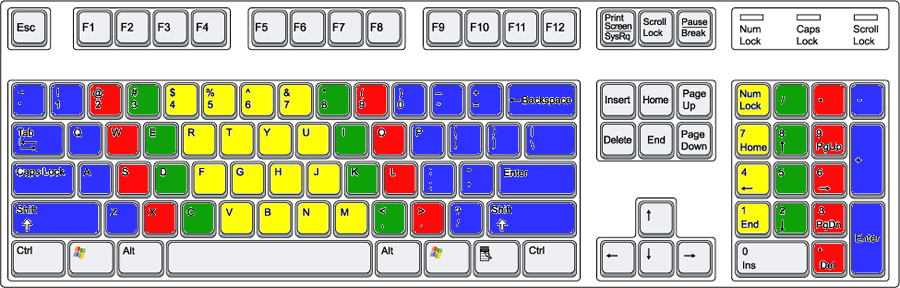
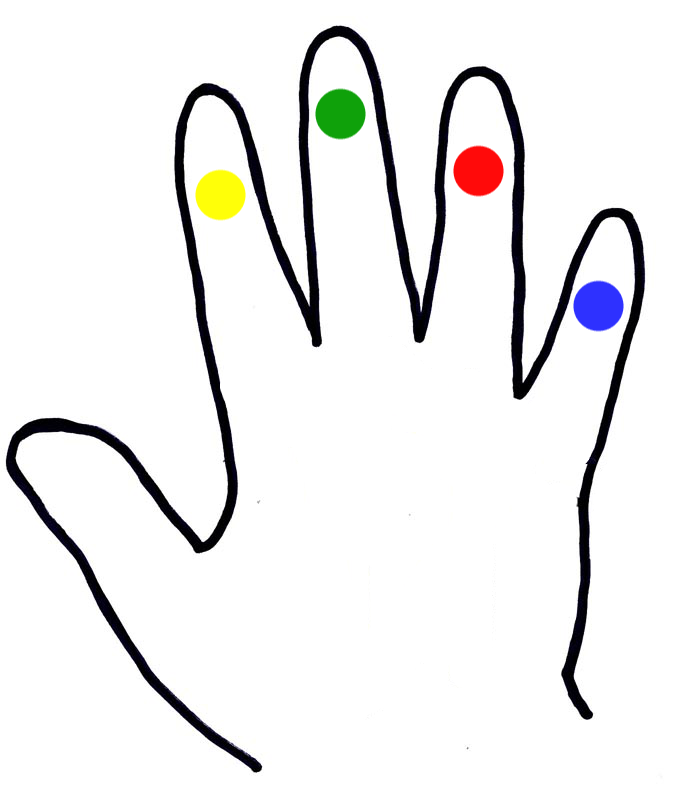
Are your hands on the HOME ROW?
- Left-hand fingers should be resting over the A, S, D, and F keys.
- Right-hand fingers should be placed over the J, K, L, and ; keys.
- Your thumbs should either be in the air or very lightly lying on the space bar.

Links for Extra Typing Practice
Click on the links below for helpful sites to keep typing skills fresh.
(All programs are web based and don't have to be downloaded.)
Dance Mat Typing

This is a fun site for beginners learning how to type. Start with Level 1 and follow the directions.
Then, move up to the other levels. This site does not time the user and is an engaging, low stress introduction to keyboarding.
Keybr.com

Keybr.com is very straightforward. You can choose from three basic lessons that start with a certain number of keys on the keyboard, and then, as you progress through the lessons, more keys are introduced to the mix to make things a little tougher.
Type Racer - Play your friends!

Power Typing

Our tutorial is designed to teach, develop and practice, step by step, typing skills. Separate lessons are written for Dvorak and Qwerty. One should go through lessons in sequence because they rehearse keys already learned as they add new ones. Instructions for hand positioning over a keyboard are included in lessons.
Keyboarding Practice Drills

Keyboarding practice is more of a traditional typing program. Those of us that studied business education classes while in high school will remember these drills. (aa ;; ss ll dd kk ff jj) It works. Some students will find this rewarding because student paced. Have the student work through the lessons as listed.
E-learningforkids.org

E-Learning for Kids has a space theme that makes it fun for kids to practice their keyboarding skills. Games can be unlocked as typists move on to higher levels. Includes computer and mouse basics for younger learners. Note: Background music can be changed or switched off.
Sense-lang.org

Sense-Lang has a nice tutorial interface with an interactive keyboard that highlights the keys you missed. WPM and accuracy are calculated as you type. There are also some fun and entertaining games.
TypingMaster

Typing Master is a site to go to for 3 great games, including, my favorite, KeyMan Typing. There is also a great 1-3 minute typing test.
Peter's Online Typing Course

Welcome to this humble course. Here you'll find a set of free online typing lessons and typing exercises for beginning typists, and frustrated hunt-and-peckers who want to move from four-finger typing to full-blown touch typing.
Artypist.com

This is a portal providing an online free typing course, created for help you in learning, improving and mastering the art of typing.
Free Typing Lessons

A complete interactive typing tutor to learn to type. Learning to type has never been easier. We teach 2 keys at a time, followed up with a review of all the keys in the previous lessons.
Keyboarding Games for Kids

These fun free typing games are a great way to continue building a solid typing foundation.
Scroll down and you will find several game options.
Typing Games

Feel free to leave a comment below
with other keyboarding sites or games that you enjoy! ")
Keyboarding Practice Drills

Keyboarding practice is more of a traditional typing program. Those of us that studied business education classes while in high school will remember these drills. (aa ;; ss ll dd kk ff jj) It works. Some students will find this rewarding because student paced. Have the student work through the lessons as listed.
E-learningforkids.org
E-Learning for Kids has a space theme that makes it fun for kids to practice their keyboarding skills. Games can be unlocked as typists move on to higher levels. Includes computer and mouse basics for younger learners. Note: Background music can be changed or switched off.
Sense-lang.org
Sense-Lang has a nice tutorial interface with an interactive keyboard that highlights the keys you missed. WPM and accuracy are calculated as you type. There are also some fun and entertaining games.
TypingMaster
Typing Master is a site to go to for 3 great games, including, my favorite, KeyMan Typing. There is also a great 1-3 minute typing test.
Peter's Online Typing Course

Welcome to this humble course. Here you'll find a set of free online typing lessons and typing exercises for beginning typists, and frustrated hunt-and-peckers who want to move from four-finger typing to full-blown touch typing.
Artypist.com
This is a portal providing an online free typing course, created for help you in learning, improving and mastering the art of typing.
Free Typing Lessons
A complete interactive typing tutor to learn to type. Learning to type has never been easier. We teach 2 keys at a time, followed up with a review of all the keys in the previous lessons.
Keyboarding Games for Kids
These fun free typing games are a great way to continue building a solid typing foundation.
Scroll down and you will find several game options.
Typing Games

Feel free to leave a comment below
with other keyboarding sites or games that you enjoy! ")
Thursday, May 24, 2012
Quick Typing Assessment!

Click on the link below and take the typing check up.
When you are finished, enter your score on your blue Keyboarding Record sheet.
Turn your Keyboarding Record in to your class box and highlight your name on the class list.
Example Keyboarding Record Entry:
Tri Date Typing Program/Site WPM Accuracy
3 5/24/12 Final Typing Check Up ?? ??%
Good Luck!

Subscribe to:
Posts (Atom)